Santa jumps from a helicopter: a Genjutsu Motion Transfer guide
Make a character reference, open our template and click Recreate. Your character takes the jump in a few minutes.
This is a clip we made with Higgsfield Genjutsu: Santa climbs out of a flying helicopter, hangs from the skid above the clouds and lets go into free fall. We took the motion from a skydiving template in Higgsfield and gave it to our own Santa character. You don't need to download anything: the motion is already saved as a template. All you need is a character reference.
Make your character reference
Genjutsu needs to know exactly how your character looks from every side, because the clip shows the character from the front, the back and from above. The best way is a character sheet: one image with a full-body front view, a full-body back view and a close-up of the face. This is the one we used:
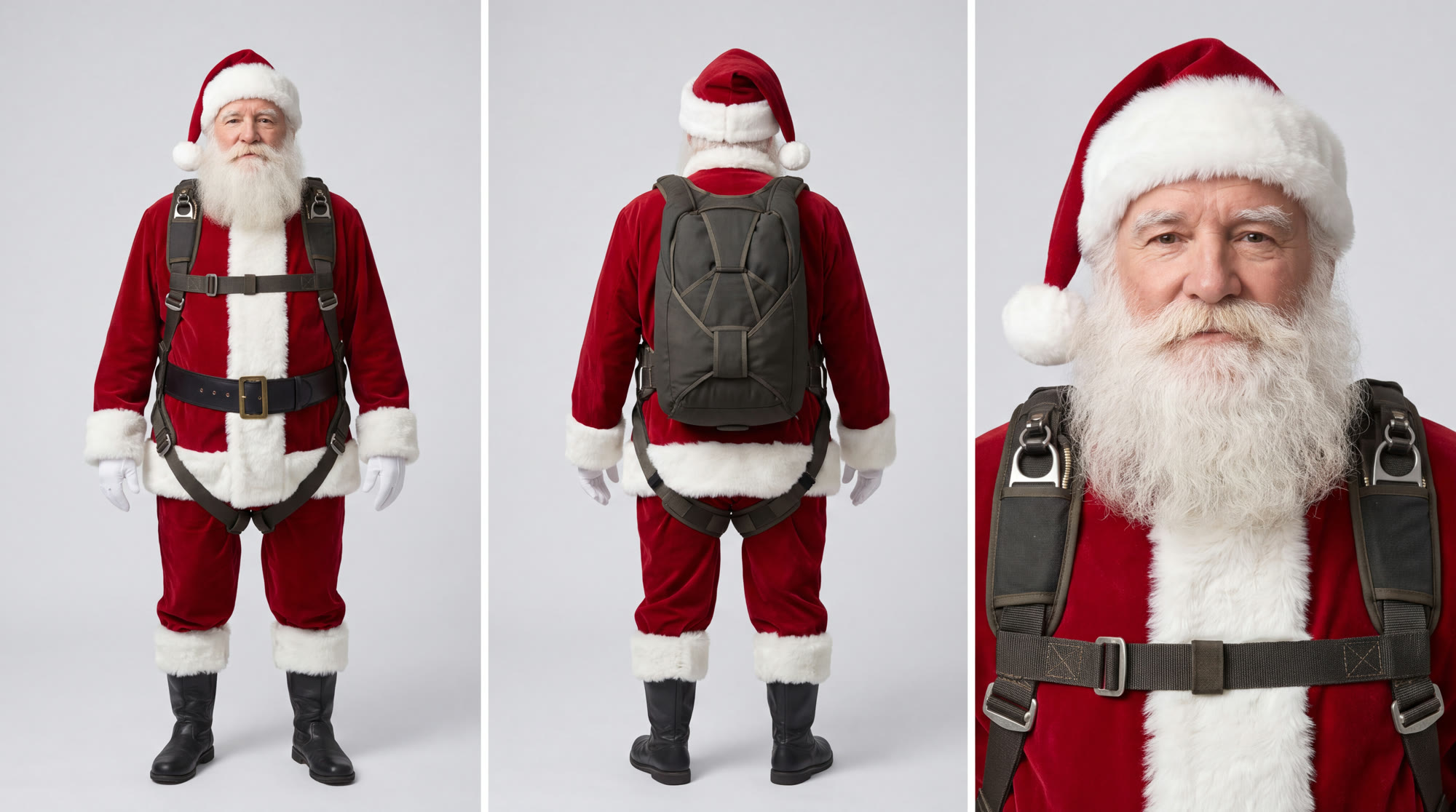
Create your own character in Higgsfield with an image model, for example Nano Banana Pro or GPT Image 2. It can be anyone: you, your avatar or a character you invent. Put the front view, the back view and the face close-up in one image, like ours, and give your character a skydiving harness and a parachute pack, because the clip is a skydive.
Open the template and click Recreate
- Click the button above and log in to Higgsfield.
- The template opens with our skydiving motion already selected.
- Click Recreate.
- Upload your character sheet as the reference image.
- Optionally, turn on the prompt and paste the prompt from block 03.
- Choose the resolution (1080p recommended) and click Generate.
Optional prompt
The template works without a prompt. If your character comes out wrong, for example the beard or the parachute pack is missing, add this prompt:
Transfer the exact motion, camera movement and timing from the source video to the character in the reference image. Keep the character's face, beard, outfit, skydiving harness and parachute pack exactly as in the reference in every frame, including the shots from behind and from above. Keep the helicopter, the skid, the sky and the clouds. Photorealistic, cinematic. Do not add any text.
Tips
- A character sheet works better than a single photo: the clip shows the back and the top of the character, and Genjutsu can't guess what it has never seen.
- Keep the parachute pack on your character, otherwise the back shots look odd.
- The exact credit cost is shown before you generate.
Only use your own face or the face of someone who has given you permission. Do not use it for impersonation, misleading or offensive content. When you publish the result, label it as AI-generated. Alveon is not responsible for content created by users. If you post your result, we'd love to see it: tag us @alveonai.
Clip, character and prompt: Alveon Studio. Tool: Higgsfield Genjutsu. Motion: Higgsfield Motion Library.